
The challenge
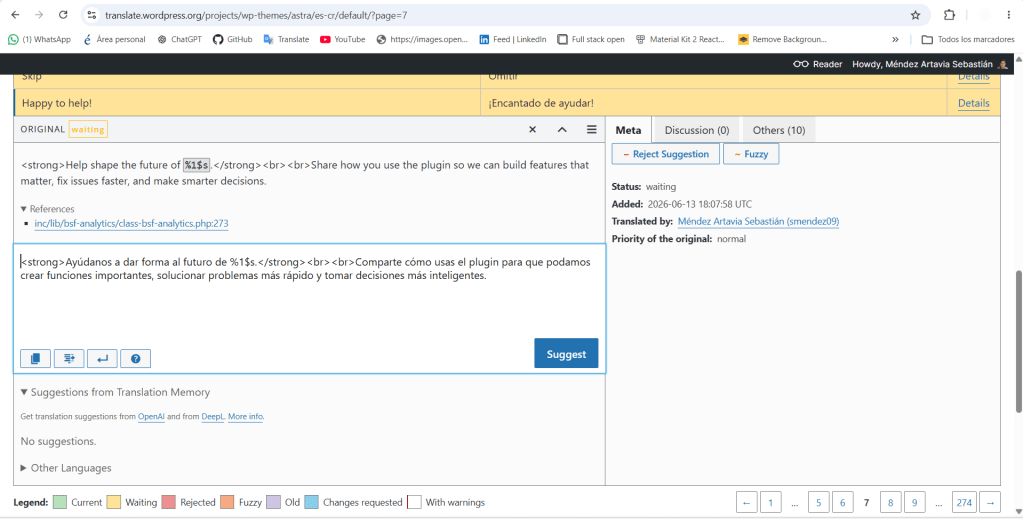
My main challenge was discovering that not all text strings are plain text. While working with the strings in the Astra theme, I encountered one that gave me trouble, or rather, made me rack my brain trying to figure out if I was doing it right or wrong, for example, the “%s”. %s is a variable, a placeholder that WordPress dynamically replaces at runtime with a real value. I learned this by searching online and seeing examples of its application in other translations from the community, which was very helpful. It’s like teamwork: seeing what other people do and replicating it to arrive at a standardized and functional result.
Why this was tricky
The rule in Polyglots is clear: variables like %s, %d, or %1$s should never be translated or moved. They must appear in the translation exactly as they do in the original. The challenge lies in constructing a natural Spanish sentence around a placeholder that cannot be modified.
A second challenge arose with strings containing HTML tags like and
. These tags structure the visual appearance of the text and must be preserved exactly. It’s basic programming knowledge, and I found it interesting to apply this to translations.
How I resolved it
I reread Polyglots’ contribution guide on variables and tested my translation by comparing the structure of the original with my version. Once I confirmed that the variables and tags were correctly structured, I submitted the suggestion. It’s now in “pending” status.
What I learned
It was then that I understood that translation isn’t just about language, but also about technical aspects, such as knowing how to correctly apply HTML tags.
What comes next
With this challenge solved, I returned to translating with more confidence. The next post documents my progress and a new batch of texts.


Leave a Reply